Drop in your messy takes. Get one clean review back.
Drop your raw clips in. Get one finished review back, with the captions and the Amazon disclosure already on it.
A review cut with ReviewCut was uploaded to an Amazon Influencer storefront and passed Amazon’s content review. The app made the cut. A person made the compliance calls.
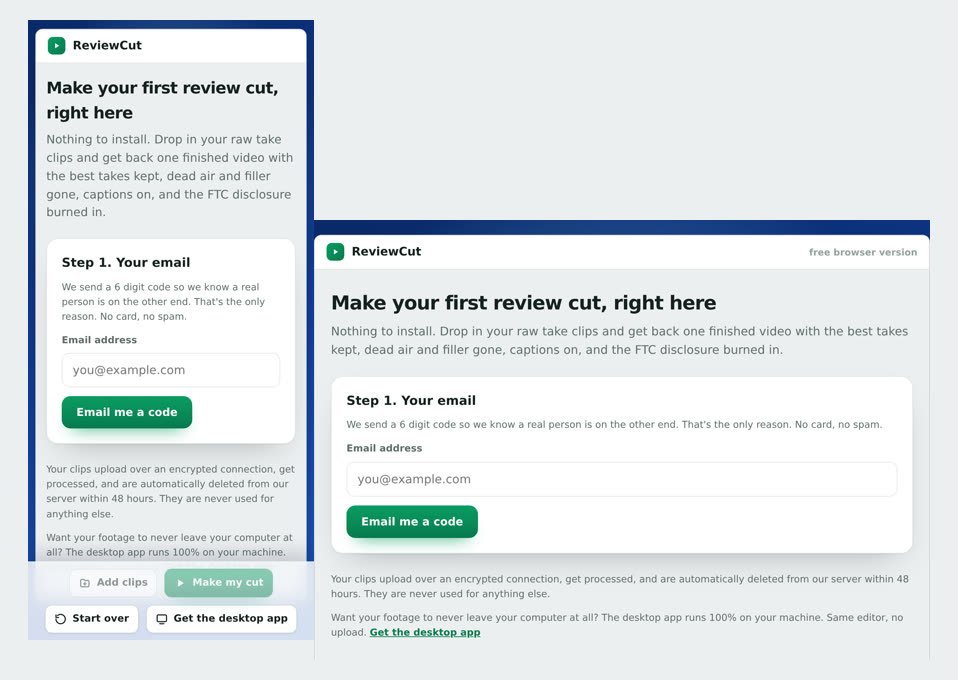
ReviewCut is my app for Amazon Influencer creators. It turns raw, multi-take product-review clips into one finished, upload-ready video.
Your footage, your choice: right in your browser with nothing to install, or 100% on your own computer with the desktop app, which finishes a video in about two minutes.
Your first finished review each month is free, no card. The rejection-proof scan that blurs the personal information Amazon rejects most is a paid-plan feature you switch on.
everything it does
- Cuts the dead air and the long pauses between your words.
- Removes the ums and filler words.
- Keeps your best take and drops the ones you fumbled.
- Writes and burns in your captions.
- Adds the Amazon disclosure automatically.
- Blurs the personal info that gets videos rejected, on the paid plans.
- Exports it ready to post to your storefront.
watch it work
Works on the messy footage you already have.
Drop your clips inPlansSee what is in each →Free$01 cut a monthCreator$19/moUnlimited cutsPro$49/moPlus revisions
- 1 finished review every month
- No card, no watermark
- Free advisory scan on every cut
- Unlimited finished cuts
- 10 rejection-proof scans a month
- 10 revisions a month
- Unlimited finished cuts
- 40 rejection-proof scans a month
- 30 revisions for higher volume
Every plan gives you both ways to cut. In your browser, your clips upload over an encrypted connection and are deleted from our server within 48 hours. On your own computer with the desktop app, your footage never leaves it.
Questions creators ask
Do I need editing skills to use ReviewCut?
No. You drop in your raw clips and download a finished video. If you can record a review on your phone, you can use it. There’s no timeline to learn.
Why do Amazon Influencer videos get rejected?
The most common reason is “personal information is visible”, a name on a shipping label, a license plate, a reflection, a prescription bottle, or an on-screen order page. On the paid plans, ReviewCut scans your finished cut for these and blurs them before you upload. The free plan doesn’t include that scan, so if you want to do it yourself, I wrote up how to blur a plate or label yourself and what the FTC disclosure actually requires.
Will my video really pass Amazon’s review?
On the paid plans, ReviewCut blurs the personal info Amazon flags most, which is the leading rejection reason. Nobody can promise Amazon approves every video, so if a video you rejection-proofed still gets rejected for personal info, your next month is free.
Is my footage uploaded to the cloud?
That depends on which way you cut. In your browser, your clips do upload, over an encrypted connection, and they’re automatically deleted from our server within 48 hours and never used for anything else. With the desktop app the editing and rendering happen on your own computer and your full video never leaves it. Either way two small pieces go out over a secure connection: the audio track goes to the transcription service so the app can find your words, and if you run a rejection-proof scan, sampled frames get checked by the vision model.
What does ReviewCut cost?
Your first finished review each month is free, no card, no watermark. Creator is $19/mo (or $190/yr) with unlimited cuts, 10 rejection-proof scans, and 10 revisions a month. Pro is $49/mo (or $490/yr) with 40 scans and 30 revisions. Your license key appears right after checkout.
How is this different from CapCut or Opus Clip?
Those tools trim one long video. ReviewCut takes a pile of repeated takes, builds one finished review out of them, levels the audio, and blurs what Amazon rejects. It only does this one job, which is why it does it well.
What if the cut isn’t right?
You don’t re-edit anything. Type what you want changed, like “tighten the intro” or “use a different opening,” and ReviewCut redoes the video. No timeline, no starting over.
What do I need to run it?
You don’t need anything special if you cut in your browser. Any phone, tablet or computer with an up to date browser works, iPhone, iPad, Android, Mac and PC included. The desktop app needs a Windows PC or a Mac with Apple silicon (M1 or newer). A typical review with a handful of takes finishes in a few minutes.
Stuck, found a bug, or have a question? Contact Miles directly, or use the Send feedback button inside the app (it attaches your run log, so bugs get fixed fastest that way).
As an Amazon Associate I earn from qualifying purchases. ReviewCut is an independent tool by Miles Insights and is not affiliated with, endorsed by, or sponsored by Amazon.
Get your first review free
Drop your email. We send you a code, you make your first cut right here in the browser, on your phone or your laptop. No card, no watermark. Prefer to work offline? The desktop app is on the next screen.